Email Signature Lifecycle Management: Onboarding to Offboarding
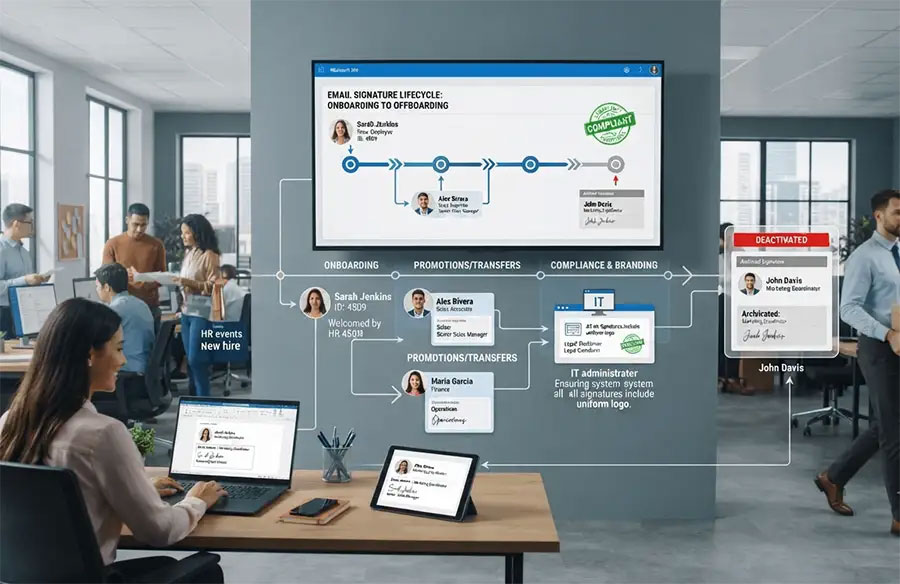
What happens when a new employee starts on Monday, but their email signature still isn't ready—or worse, a former employee continues sending emails with outdated company branding after they've left? For most organizations, this isn't a hypothetical. It's a Tuesday.
Email signatures rarely make it onto anyone's strategic radar. They're treated as a small, one-time setup task rather than something that needs to keep pace with an employee's entire journey through the company. But think about everything that happens over the course of someone's employment: they get hired, promoted, moved between departments, relocated to a different office, and eventually, they leave. Every one of those moments has the potential to leave a signature out of date—or worse, still active when it shouldn't be.
This matters more than it seems. A consistent, accurate signature shapes how customers and partners experience your brand in every single email. An outdated or forgotten one can quietly damage that experience, create compliance risks, and pile unnecessary work onto IT and HR teams who already have enough to manage.
In this article, we'll walk through why signatures deserve attention at every stage of the employee lifecycle. What can go wrong when they're left unmanaged, and how can automation turn a recurring headache into a background process nobody has to think about?
Why Signatures Deserve Attention at Every Stage
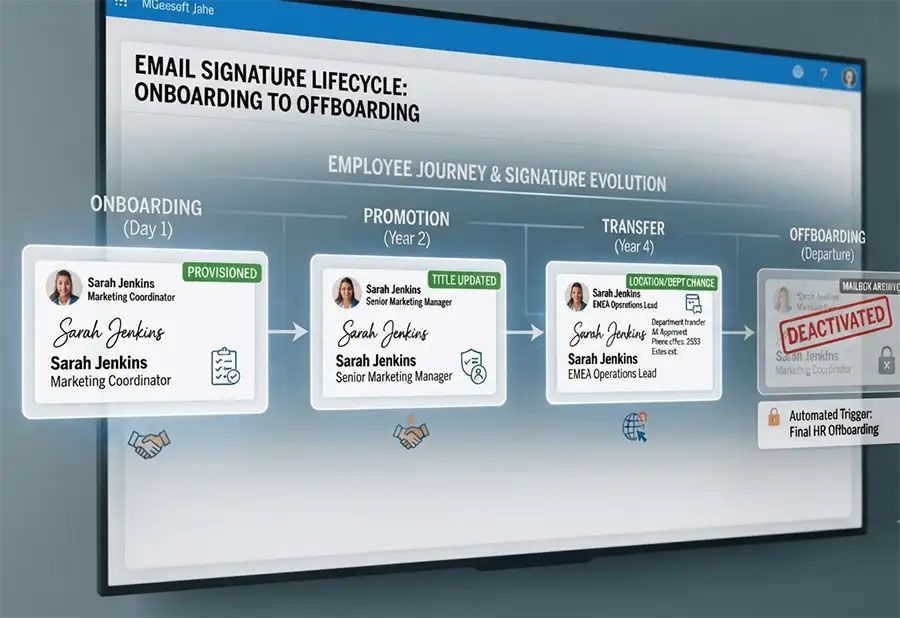
It's easy to think of an email signature as something you set up once and forget. In reality, it's a living piece of company identity that should evolve alongside the person using it. A signature isn't just a name and a job title—it reflects current branding, legal disclaimers, contact details, and sometimes even security certifications. When any of these details fall out of sync with reality, the mismatch is visible to every single person who receives that email.
Onboarding: Setting the Tone from Day One
First impressions count, and for many external contacts, a new hire's first email is their first impression of that person representing the company. Choosing the right email signature management, ready on day one, signals that the organization is organized and professional. Yet in many companies, new employees either go without a proper signature for their first few days or are handed a static template to copy and paste—one that's easy to get wrong.
Coordinating this well means connecting HR onboarding checklists with IT provisioning tasks so signatures are created automatically as soon as an employee's details are added to the system, rather than as an afterthought once someone remembers.
Keeping Signatures Accurate Through Promotions, Transfers, and Relocations
Employees don't stay static, and neither should their signatures. A promotion changes a job title. A department transfer changes a phone extension or reporting line. An office relocation changes an address. Each of these events is a small update, but multiplied across a growing workforce, manual updates become an ongoing drain on IT time—and an easy way for outdated information to slip through.
This is one of the areas where a bit of foresight pays off. Building a habit of periodically auditing signatures against current HR records catches these small mismatches before they become customer-facing embarrassments.
Temporary Staff, Contractors, and Seasonal Employees
Contractors and seasonal staff often get overlooked entirely in signature planning, either going without one or using a shared, generic version. But these employees are frequently client-facing too. Giving them accurate, appropriately scoped signatures—and making sure those signatures are deactivated the moment their contract ends—closes a gap that many companies don't realize exists until it causes a problem.
Offboarding: The Step Companies Forget
Onboarding tends to get the spotlight, but offboarding is arguably just as important, if not more so. A former employee's account still sending emails with the company logo, job title, and contact details creates real risk: customers can be misled about who they're speaking with, and outdated signatures can undermine trust if a departure was less than amicable. For regulated industries, an active signature tied to someone who no longer works there can even raise compliance questions.
Treating offboarding as a defined checklist item—rather than an assumption that "IT will handle it eventually"—closes this gap. For organizations working through the added complexity of restructuring or ownership changes, the same principle applies to signature challenges that come up during mergers and acquisitions, where entire teams and brands can shift at once.
Security, Compliance, and Brand Protection
Signatures touch more than aesthetics—they intersect with security and compliance too. A signature might carry a legal disclaimer required by regulation, a data protection notice, or details that need to match specific formatting rules for industries like healthcare or finance. Getting this wrong isn't just a branding slip; it can be a compliance failure. Organizations working in regulated sectors can find a useful reference point in this GDPR and HIPAA compliance checklist for email signatures, which lays out the kinds of details that often get missed.
From a security standpoint, unmanaged signatures across hundreds of individual mailboxes also create inconsistency that's hard to audit. Microsoft's own guidance on managing mail flow and transport rules in Exchange Online highlights how centralizing control at the server level, rather than relying on individual desktop settings, reduces both risk and administrative overhead.
Building an Automated Lifecycle Process in Microsoft 365
The common thread through onboarding, transfers, and offboarding is that they're all triggered by changes already recorded somewhere in HR systems. The opportunity is connecting those triggers directly to signature updates, so a promotion in the HR system automatically updates a job title in the signature, and a termination date automatically deactivates one.
For companies already built around Microsoft 365, this kind of centralized, server-side management removes the guesswork. A well-structured approach is covered in this complete enterprise guide to Microsoft 365 email signature management, which walks through how centralized deployment keeps every mailbox consistent without relying on individual employees to update anything themselves. Removing that manual step is also central to the idea of zero-touch governance, where employees are no longer responsible for maintaining their own signatures at all.
Five Signs Your Organization Needs Automated Life Cycle Managment
- New hires regularly go a week or more without a proper signature
- IT fields recurring signature update requests as tickets
- Former employees' accounts remain active with company branding after departure
- Signatures across the same department look noticeably different from each other
- No one can say with confidence how many signature versions currently exist across the company
A Realistic Picture: Growth Without the Chaos
Consider a mid-sized enterprise expanding quickly. In one month, a new marketing hire joins, an operations employee is promoted to team lead, someone transfers from sales to customer success, and a longtime employee in finance leaves the company. Handled manually, that's four separate requests routed to IT, each requiring someone to remember the right template, update the right fields, and disable the right account on the right date. Miss one, and a departed employee's signature might still be active weeks later.
With an automated lifecycle process in place, each of these changes flows from the HR system into the signature platform without anyone needing to file a ticket. The new hire's signature is ready before their first email goes out. The promotion updates the title automatically. The transfer updates the department line. The departure deactivates the account on schedule. Branding stays consistent, compliance details stay accurate, and IT is freed up for higher-value work. This kind of scalability becomes especially important as headcount grows, a challenge explored in signature automation for large enterprises scaling 10,000+ users.
Practical Steps You Can Take Today
A few habits go a long way toward keeping signature management under control:
- Connect signature provisioning directly to HR onboarding workflows so new hires never start without one
- Set a recurring schedule to audit existing signatures against current employee records
- Build offboarding into IT checklists as a required, dated step—not an assumption
- Standardize signature templates centrally rather than allowing individual editing
- Treat signature compliance details the same way you'd treat any other regulated content
Final Thoughts
Email signature management isn't something that ends once templates are deployed. It's a process that should move alongside employees as they join, grow, change roles, and eventually leave the organization. Treating it as a one-time project, rather than an ongoing lifecycle, is exactly how outdated branding and lingering former-employee accounts slip through.
Crossware helps organizations automate this entire lifecycle within their existing Microsoft 365 environment. It connects signature updates to the HR and IT events that already trigger them, so accurate, on-brand, and compliant signatures follow every employee automatically. From their first day to their last, no extra work is added for anyone along the way.